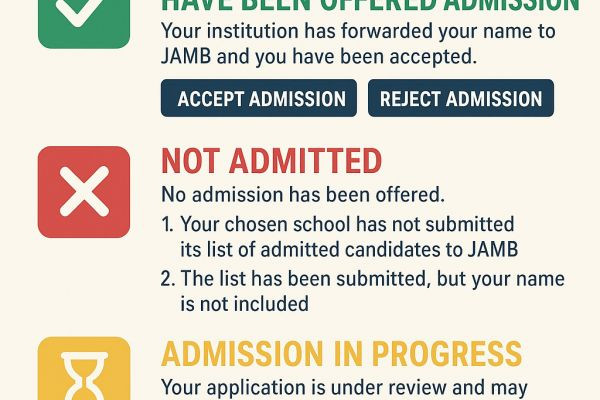
As the Joint Admissions and Matriculation Board (JAMB) continues to process undergraduate admissions via its CAPS (Central Admissions Processing System) portal, many 2025 candidates are puzzling over the different status messages displayed on their dashboards. Below is an expert breakdown of the key statuses and their implications.
✅ “Congratulations, You Have Been Offered Admission”
If your Admission Status reads this phrase, it means your institution has forwarded your name to JAMB and you have been accepted. At this stage, two buttons will appear: Accept Admission and Reject Admission.
Accept Admission locks in your place; once accepted, the admission window closes for other schools.
Reject Admission places your profile into the CAPS Marketplace, making you eligible for further offers from other institutions. (SchoolNewsNG)
❌ “Not Admitted”
This status indicates that no admission has yet been offered. It may mean that:
Your chosen school has not submitted its list of admitted candidates to JAMB.
The list has been submitted, but your name is not included.
Applicants with this status should remain alert — the situation may change if additional slots open up. (SchoolNewsNG)
⏳ “Admission in Progress”
This suggests that your application is under review and may still receive final approval. You might have met the baseline requirements, but your admission is pending due to factors such as quotas or additional institutional criteria. Should other candidates decline their offers, new slots may open. (SchoolNewsNG)
? “Recommended”
When this appears, it means your candidacy has been considered and forwarded for further scrutiny to confirm that all requirements are satisfied. In effect, it’s a middle ground between “in progress” and full acceptance. (SchoolNewsNG)
Tips for Candidates
Always check your status via your official JAMB profile, not through third-party sites. (SchoolNewsNG)
If experiencing login issues, try switching to a desktop browser or using a different browser altogether. (SchoolNewsNG)
Be patient—status updates may come after your first check, especially after schools release their final lists.
follow us on whatsapp
https://whatsapp.com/channel/0029VaAOIUe9mrGeBhrju12bDownload our Mobile App for easy access
https://play.google.com/store/apps/details?id=com.edutvmobile.ng&hl=enMobile App Lite
https://play.google.com/store/apps/details?id=com.edutvng.lite
https://play.google.com/store/apps/details?id=com.edutvmobile.ng&hl=enFollow us on Youtube
https://youtube.com/@edutvnigeriaFollow us on LinkedIn -
https://ng.linkedin.com/company/edutvnigeriaFollow us on Instagram
https://instagram.com/edutvnigeriaFollow us on Facebook
https://www.facebook.com/edutvnigeria/